Next is time lapse I made in August 2015 at a spooky old abandoned house I came across off Highway 17 north of McClellanville. The videos are six seconds in length.
Friday, September 18, 2015
Time Lapse Videos (iPhone 5)
One of the many cool and fun features of smart phones is the time lapse video capabilities. I've only done a few of these, but they are neat to do. Minutes of video is condensed to six seconds. Here are some examples. I call this first one, simply, "I-26", a route I am very familiar with through my daily commutes from North Charleston to Orangeburg (and back). This was taken in June 2015, my first-ever iPhone time lapse effort.
Next is time lapse I made in August 2015 at a spooky old abandoned house I came across off Highway 17 north of McClellanville. The videos are six seconds in length.
Finally, here's my "Day at the Beach" (Sullivans Island) time lapse made this summer. For some reason, this clip is only two seconds, so watch quickly!
I'm looking for more opportunities for time lapse videos!
Next is time lapse I made in August 2015 at a spooky old abandoned house I came across off Highway 17 north of McClellanville. The videos are six seconds in length.

Tuesday, September 15, 2015
Green Screen Fun: Where Do You Want To Be?
Our TV studio's "green screen" walls have been in demand this semester. Already this semester, three or four students and student organizations have booked time for various video and still photography projects.
So this got me thinking that my Electronic Media Production II students should be exposed to the capabilities of green screen or chroma key technology, as it's also called. What this allows us to do is superimpose a background to the photo or video shots against a solid green backdrop. Blue also works.
Here are a couple before and after examples. I processed in Adobe Premiere Elements, which we have in our Dell and student computer labs in Crawford.


I used PhotoShop in the second image to crop the black border.
Here's another version of the Running of the Bulls in Pamplona, Spain. This one has some action of me running! Thanks to my students Stephen and Marcos for taking a few shots of me against the studio green screen. One tip, it would look better if I was shot from farther back so I would be smaller in the action shot.


In Adobe Premiere Elements, here are the steps to take your green screen image/video and put it against the desired background:


o remove the Green Screen effect, right click on taffected clip, go to Remove Effects (note: you must have that clip highlighted or clicked on for this step to work)
So this got me thinking that my Electronic Media Production II students should be exposed to the capabilities of green screen or chroma key technology, as it's also called. What this allows us to do is superimpose a background to the photo or video shots against a solid green backdrop. Blue also works.
Here are a couple before and after examples. I processed in Adobe Premiere Elements, which we have in our Dell and student computer labs in Crawford.


Here's another version of the Running of the Bulls in Pamplona, Spain. This one has some action of me running! Thanks to my students Stephen and Marcos for taking a few shots of me against the studio green screen. One tip, it would look better if I was shot from farther back so I would be smaller in the action shot.


In the shot below, I had the camera back several feet from the above one, when taking the photo of me against the Green Screen. I may have been too close to the wall in the one below. Some green is bleeding over on the outline of my shirt.

In Adobe Premiere Elements, here are the steps to take your green screen image/video and put it against the desired background:

For still shots, the final step, missing from the above, is to hit the camera icon to save as a still shot the image the cursor is on in Adobe Premiere Pro.It will be saved as a bmp file format, which can be uploaded or inserted to your Blogger post.
Here is a screen capture of where the two shots should go. Your green screen background shot goes in Video 2 and your background image in Video 1.

o remove the Green Screen effect, right click on taffected clip, go to Remove Effects (note: you must have that clip highlighted or clicked on for this step to work)
Tuesday, September 8, 2015
Video Sequence Example: TV Studio and Control Room Set Up
To demonstrate a how-to step-by-step sequence shooting and editing video, I chose to show the steps involved in getting SC State's Communications Program's television studio set up for a production.
The studio is on the second floor of the Communications Program facility in the former Crawford Engineering Building.
Here is what's involved before the "lights, camera, action" can take place!
I can't wait to see the sequence videos my students produce and share on their blogs!
Also, the music in this video, a tune called "Daily Beetle," is courtesy of the free music website Incompetech.com.
Thursday, August 27, 2015
5 Shot Sequence Shooting Method
In my TV production class this semester we are learning about video sequence shooting, or what the author of this article calls the "five shot method." By whatever name, the thought process involves planning shots, step-by-step and seeing the video in your mind before and during the shoot.
For my example, I chose to show five steps involved in turning on the department's TV studio:
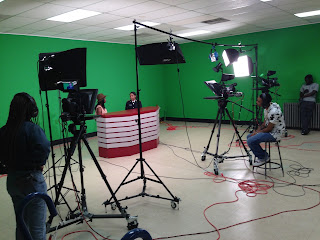
Wide Shot: This is a wide shot of the TV studio in use. I would use this shot first in a sequence because it lets the viewer see right away where the action is taking place.

Medium Shot: Now we take you inside the control room where the director/switcher runs the show! A microphone-headset connection allows the director and/or other control room people to communicate with the camera operates and "talent" on the set.
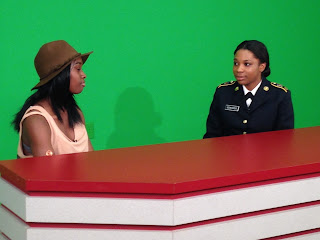
Medium Shot: We clearly see both the interviewer, Destinee Chambliss, and her guest Jessica Edwards, an ROTC student at SC State.
The studio is green so that different sets can be brought up digitally. Click here for more on green screen effects.

Close-up Shot: Tight shot through a monitor of Jessica Edwards, with her name at the bottom. The Tricaster video producer is used to create the "virtual set" background by way of chroma key technology.

A true behind-the-scenes- image from behind the set with a view of the studio cameras, the crew operating them, and some studio lights.
For my example, I chose to show five steps involved in turning on the department's TV studio:

Wide Shot: This is a wide shot of the TV studio in use. I would use this shot first in a sequence because it lets the viewer see right away where the action is taking place.

Medium Shot: Now we take you inside the control room where the director/switcher runs the show! A microphone-headset connection allows the director and/or other control room people to communicate with the camera operates and "talent" on the set.

Medium Shot: We clearly see both the interviewer, Destinee Chambliss, and her guest Jessica Edwards, an ROTC student at SC State.
The studio is green so that different sets can be brought up digitally. Click here for more on green screen effects.

Close-up Shot: Tight shot through a monitor of Jessica Edwards, with her name at the bottom. The Tricaster video producer is used to create the "virtual set" background by way of chroma key technology.

A true behind-the-scenes- image from behind the set with a view of the studio cameras, the crew operating them, and some studio lights.
Tuesday, August 25, 2015
Communications' Television Studio In Action!
In this video, we see the steps involved in setting up the very fine TV studio on the second floor of Crawford Communications on the campus of South Carolina State University.
Once the studio and control room are prepared, it's time for...Lights...Cameras....Action!!!
The NewTek Tricaster allows for use of virtual sets and the switching among the three studio cameras. I'ts a real neat systems that, with a little bit of training, has the students doing lots of interviews and other projects.
Thursday, August 20, 2015
Improvements in the Communications Program!
Over the summer there were many improvements to the Communication Program's second floor classrooms, labs and other facilities in the old Crawford Engineering Building. Plus, a new staff member has been added to assist in all areas of students services and faculty support.
A major upgrade is in the three main classrooms, rooms 203, 205 and 208. New StarBoard systems have been added.
A major upgrade is in the three main classrooms, rooms 203, 205 and 208. New StarBoard systems have been added.
Saturday, April 18, 2015
Cookbook Author Holly Herrick Interviewed in Communications TV Studio
Communications major Destinee Chambliss conducted a high quality interview with Charleston-based cookbook author Holly Herrick on April 9.
The interview was recorded in the S.C. State Communications Program's television studio located in Crawford Hall, new home to the growing program.
The interview was recorded in the S.C. State Communications Program's television studio located in Crawford Hall, new home to the growing program.
Subscribe to:
Posts (Atom)